
Product Business
Record sales, manage stock, keep product costs and see estimated profit. Use cash, transfer, POS or customer credit.
jèrè
Live / Near LaunchRun your shop, online sales or service work with Jèrè (Jere). Combine three business modes to manage stock, orders, jobs, invoices and payments alongside expenses and estimated profit. Built for small businesses in Nigeria and across Africa. Product sales can be recorded offline with Plus.
Product sales offline with PlusOpen for sign-up in early access.
Read the Jèrè product guide →See how Jèrè fits your day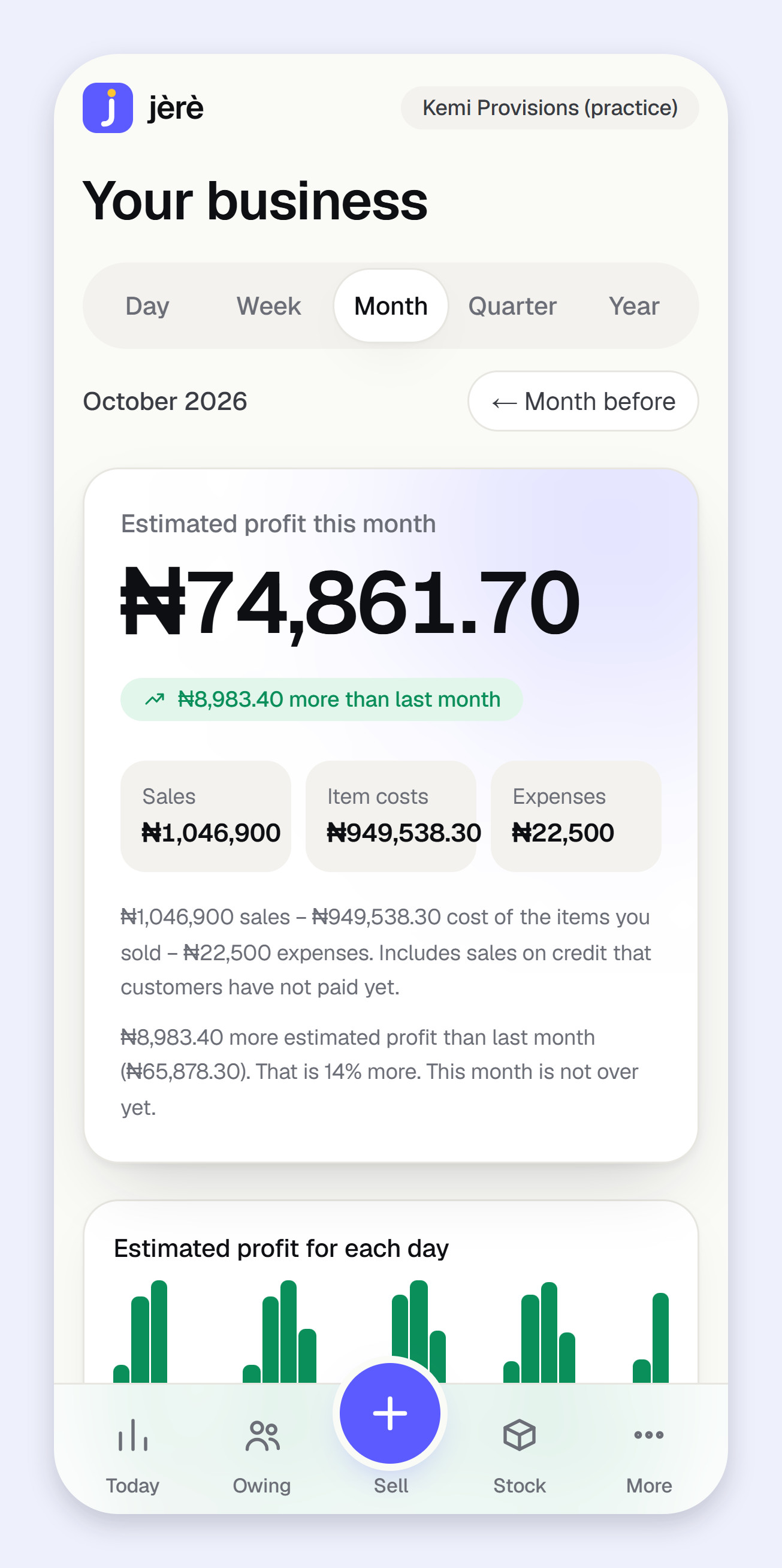
Choose how you work
A shop can take WhatsApp orders and offer services too. Keep the same business and customer records, then choose the shortcuts that fit your day.
Record sales, manage stock, keep product costs and see estimated profit. Use cash, transfer, POS or customer credit.
Record orders from WhatsApp, social media, a website or phone. Track confirmation, packing, delivery, returns and customer refunds.
Manage customer jobs, quotes, invoices, deposits, payments, job costs and recorded work time. Compare results for your jobs.
Already using Jèrè? Open More → Business modes. Choosing a mode changes your shortcuts and keeps your existing records accessible in More. Service and online-order changes need internet.
See mode setup and workflow steps →Offline with Jèrè Plus
A lost connection should not leave your next sale on a scrap of paper. Jèrè keeps entries on your phone and sends them automatically when you are back online.
Follow the offline sales walkthrough →01
Sign in and let Sell load to save your products and customer names. Open Today and Owing online with your PIN set to keep those figures too.
02
When the connection drops, use the offline tabs. The waiting list shows what has been saved and what still needs to be sent.
03
Jèrè sends waiting entries automatically. They count in your business records once sent. Entries that need attention stay visible with a reason.
Offline use is part of Plus; Basic works online. Saved views are the last copy on that phone. Mode changes, service jobs and invoices, online orders, delivery, returns and refunds need internet on both plans. Adding customers, changing existing prices or stock, cancelling sales and account changes also need internet. Keep the phone’s browser data until all waiting entries have been sent.
Your working day, in one place
Keep your sales, customer jobs, invoices and online orders together with stock, expenses and customer balances. Track service deposits, delivery and refunds without counting the same payment as another sale.
Business modes
Combine Product Business, Online Business and Service Business. Choose a main workflow for your shortcuts and change it later without deleting records.
Online orders
Save drafts without changing stock or money. Confirm once to record the sale, then track packing, dispatch and delivery or pickup separately.
Service jobs & invoices
Record jobs, quotes, invoices, deposits and part-payments. An active invoice becomes earned service income when its job is completed.
Job costs & time
Assign existing expenses or record a new job expense once, log time worked and compare earned invoice income with assigned costs. Unrecorded costs and unassigned overhead are excluded.
Returns & refunds
Record returned goods and delivery credits, restore resalable stock and reduce eligible unpaid debt. Record full or partial refunds of money already returned and see what is still due.
Offline with Plus
With Plus, record sales, customer payments, expenses and new products offline. Entries wait on your phone and send automatically when the connection returns.
Sales & receipts
Cash, transfer, POS or credit. Record part-payments and share a receipt through WhatsApp or another app you choose.
Stock
Keep a stock list, record restocking and spot products running low before the next customer asks for them.
Expenses
Record transport, electricity, rent and other business costs. Set reminders for expenses that come round regularly.
Customer debts
Keep customer debts and payments together. See what is still owed and send a reminder yourself.
Team access
Invite a cashier by code and choose what they can see. Cashiers can record sales without seeing your costs or profit.
Supplier debts
Keep supplier credit and payments together. See who you still need to pay and how much is outstanding.
Cash checks
Enter the cash you counted and compare it with what your records say you should have. See the amount that matches, is short or is extra.
Profit & reports
Find your best earners, products sold below cost and stock that has not sold. Compare your business figures by day, week, month or year.
Business check-up
A business check-up uses your records to show what is going well and what needs a look. You can also choose to receive a weekly email summary.
Staff pay
List who you pay, how much and when it is due. Record a payment as a staff expense when you pay them.
Business capital
Record money you put into the business, loans, repayments and money taken out. Keep those movements separate from sales and estimated profit.
Set the app lock to cover your figures when you leave Jèrè. Use your PIN to unlock it when you return.
Download your records from My data and account whenever you need a copy outside Jèrè.
A clearer view of profit
A sale brings money into the picture. The cost of the goods and your business expenses belong there too. Jèrè brings them together to show estimated profit.
How the estimate works
Sales
− Cost of the items sold
− Recorded expenses
= Estimated profit
The estimate depends on the records you enter. Credit sales can count towards profit before customers have paid you.
Understand cashflow and profit →Inside Jèrè
These screens show a practice business with made-up figures. They are examples of the app, not customer results.
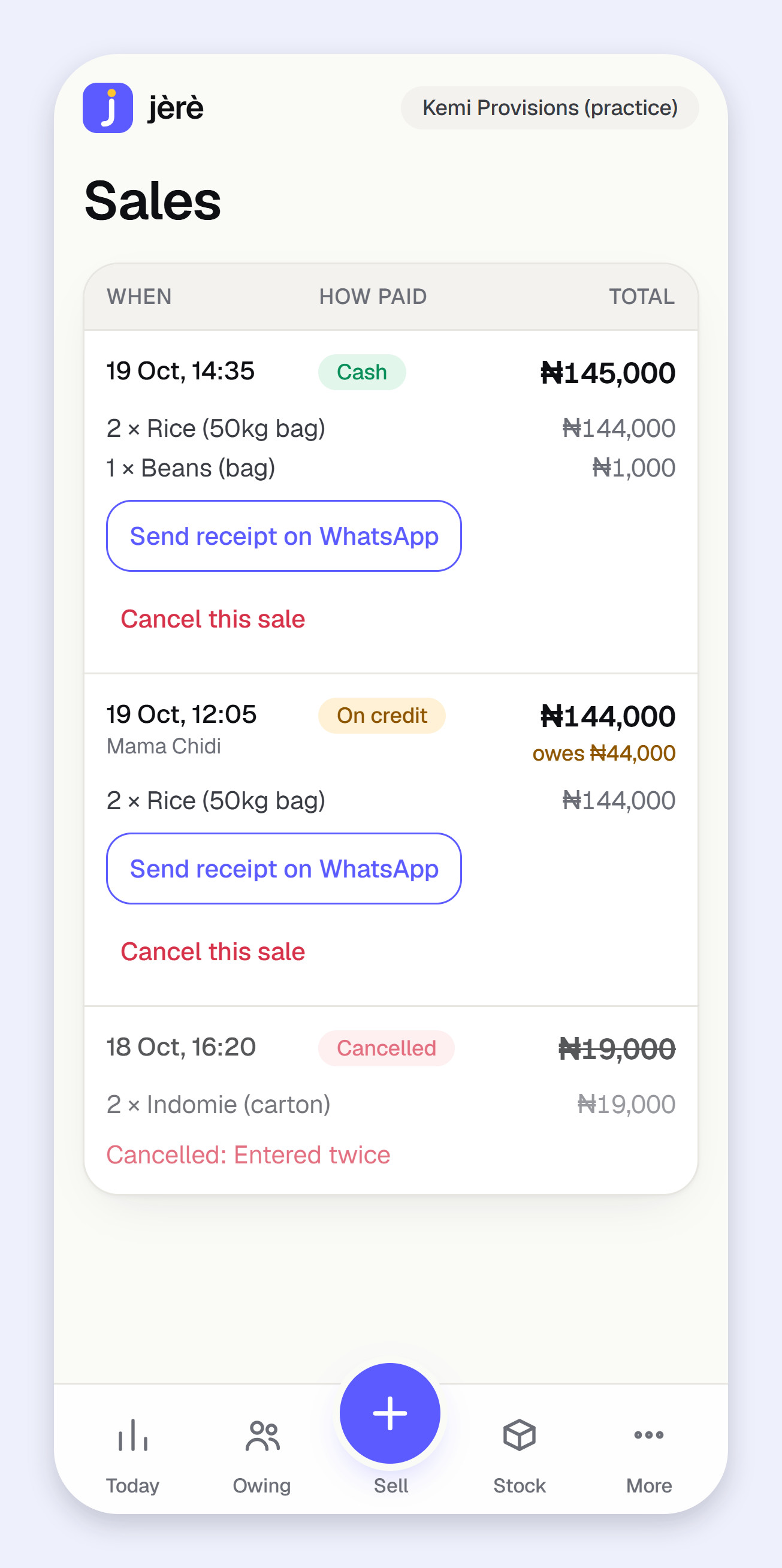
See sales and share receipts with customers.
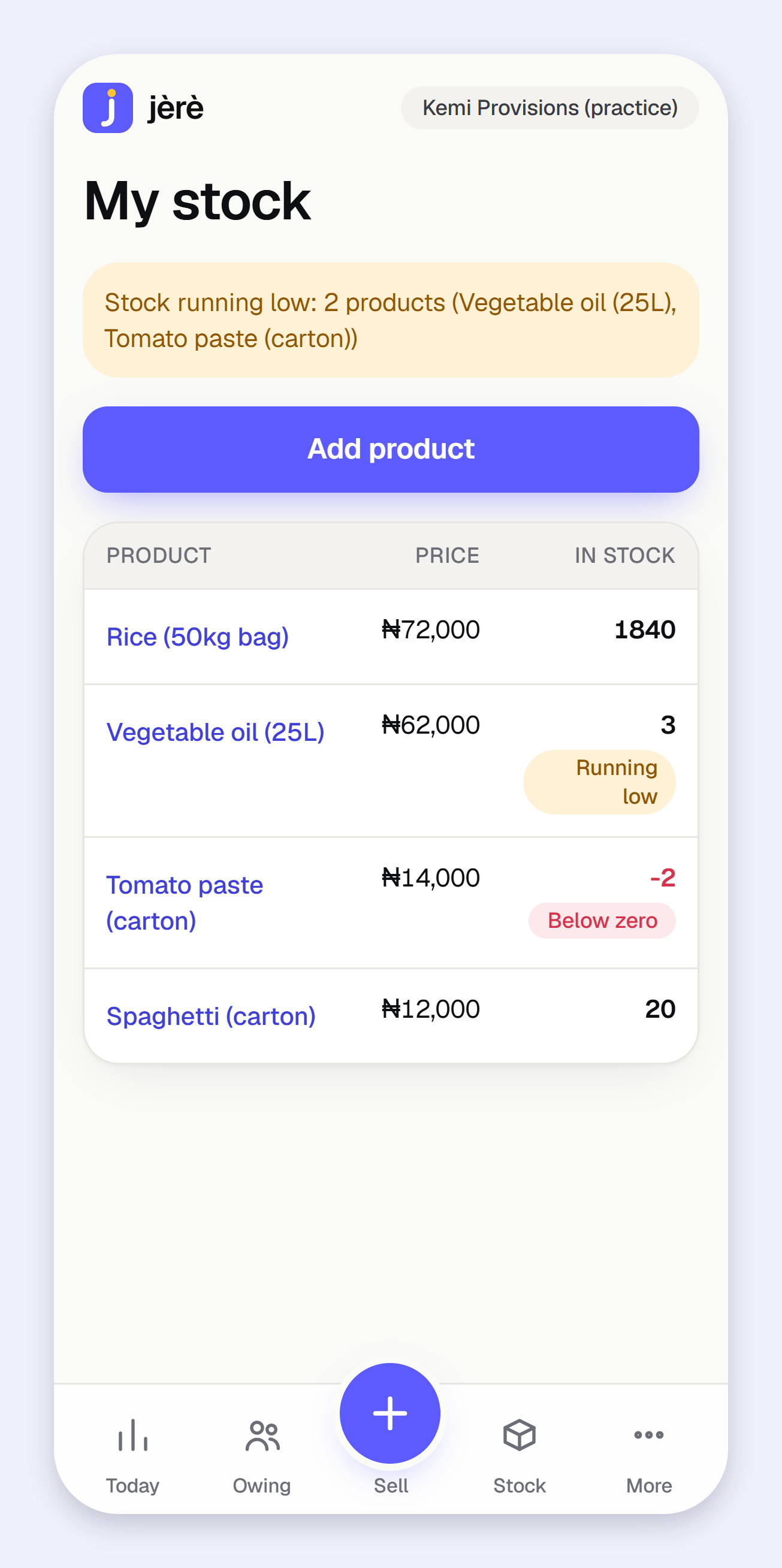
See your products and the ones running low.
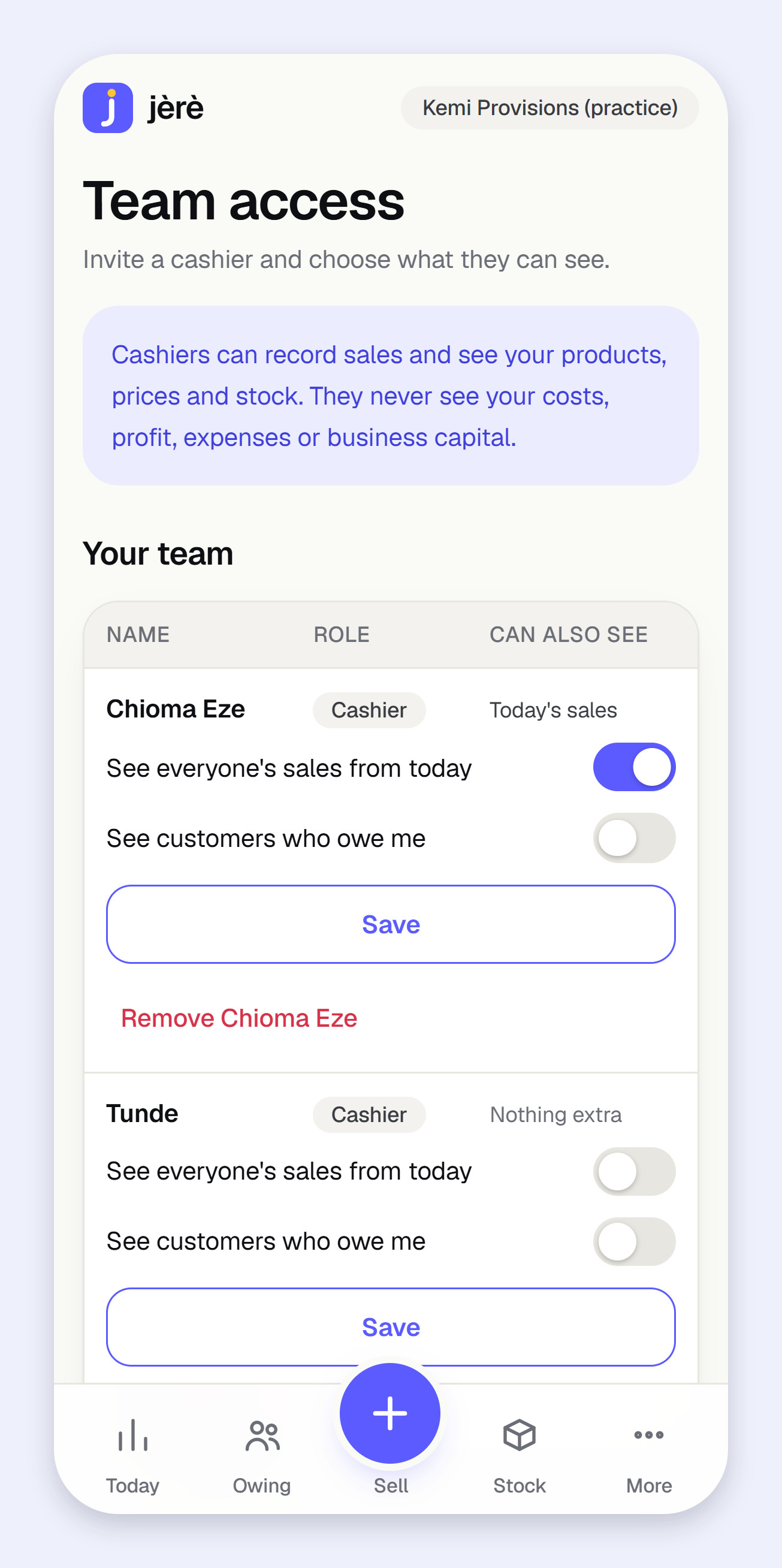
Give each team member the access their work needs.
Select Product Business, Online Business, Service Business or a combination. Choose one main workflow for your shortcuts.
Record product sales, confirm orders or invoice service jobs. Track payments, deposits, costs and delivery as they happen.
Check estimated profit, outstanding customer balances and refunds due. Compare product results and earned service income with assigned job costs.
Before you get started
Read app help. Have another question? Talk to SOLFLIGH TECH.
Yes. Open More, then Business modes, select the modes you use and choose your main workflow. It changes shortcuts, not records, your plan or team permissions. Existing records remain accessible in More.
When the owner confirms it. Saving a draft does not reserve stock or record money. Confirmation records one sale and deducts stock. Packing and delivery updates do not record a second sale or collect payment.
Yes. Issue the agreed service invoice and record the deposit on it. The deposit is money received. The invoice becomes earned service income when the job is completed; later payments reduce its balance without becoming another sale.
No. Jèrè records money you have already returned by cash, transfer or POS reversal. Record the goods or delivery credit first, then record full or partial refunds against the amount still due. Any eligible unpaid product debt is reduced before a cash refund becomes due.
These workflows and business mode settings are owner-only. Cashiers retain their existing product sales and permitted customer-payment access. Choosing a mode does not grant new permissions.
Jèrè (Jere) helps small shops in Nigeria record sales without internet on Plus. Open Sell online first to save your products on that phone. Offline entries stay on the phone and send automatically when the connection returns. They count in your business records once sent. Basic needs internet.
Jèrè (Jere) brings product sales, online orders and service jobs into one business, alongside stock, expenses, customer balances and estimated profit. Choose or combine three business modes. It is built by SOLFLIGH TECH with an Africa-first focus.
Yes. Jèrè is open for sign-up in early access. Choose Create your account to get started, or sign in if you already have an account. We will tell you before we start to charge.
Yes. Plus lets you record product sales, product customer payments, expenses and new products offline, check saved stock, and read saved Today and Owing figures with your PIN. Open Jèrè online first so it can save a copy on your phone. Entries send automatically when you reconnect and only then count in your business records. Saved figures show when they were last updated. Basic needs an internet connection.
Business mode changes, service jobs, invoices, deposits, job costs and time, online orders, delivery updates, returns and refunds need internet on both Basic and Plus. Adding a new customer, changing an existing product’s price or stock, cancelling a sale, and changing your PIN or account also need internet. Offline credit sales use customers already saved on your phone. Keep entries waiting to send on that phone until they have been sent; clearing browser storage can remove them.
Yes. Open My data and account in Jèrè to download your business records.
Money collected and profit answer different questions. Product sales count when recorded, and online order sales count when confirmed. Service invoices count as earned income on job completion; earlier deposits are money in, not earned income. Costs, expenses and recorded returns affect your estimated profit. Later payments do not create another sale. Your estimate depends on the records you enter.
Yes. You can invite a cashier by code and choose their access. Cashiers can record sales without seeing your costs or profit.
Jèrè runs in your browser. You can also add it to your phone’s home screen.
Jèrè by SOLFLIGH TECH
Choose your business modes and start recording your sales, online orders or service jobs. Open for sign-up in early access.
Problem Awareness
Sales happened and money moved, but the day ends with the same question: did we actually make money today or just stay busy?
Read article →Solution Awareness
Cashflow answers “did money move?” Profit answers “did we create value after costs?” Mixing them up is why daily decisions feel uncertain.
Read article →Solution Awareness
A daily routine for clarity without accounting confusion: revenue, operating expenses, and profit status (proven or unavailable).
Read article →